Showing posts with label Tables. Show all posts

Tuesday, 15 September 2015

How to create a table in SQL server with Management studio ?

Here are the few steps to create a new table in SQL server.

Step 1 :

Right click the tables folder and click the new table option.


 Step 2 : 

Enter the Column Name ,datatype and Allow Nulls columns.
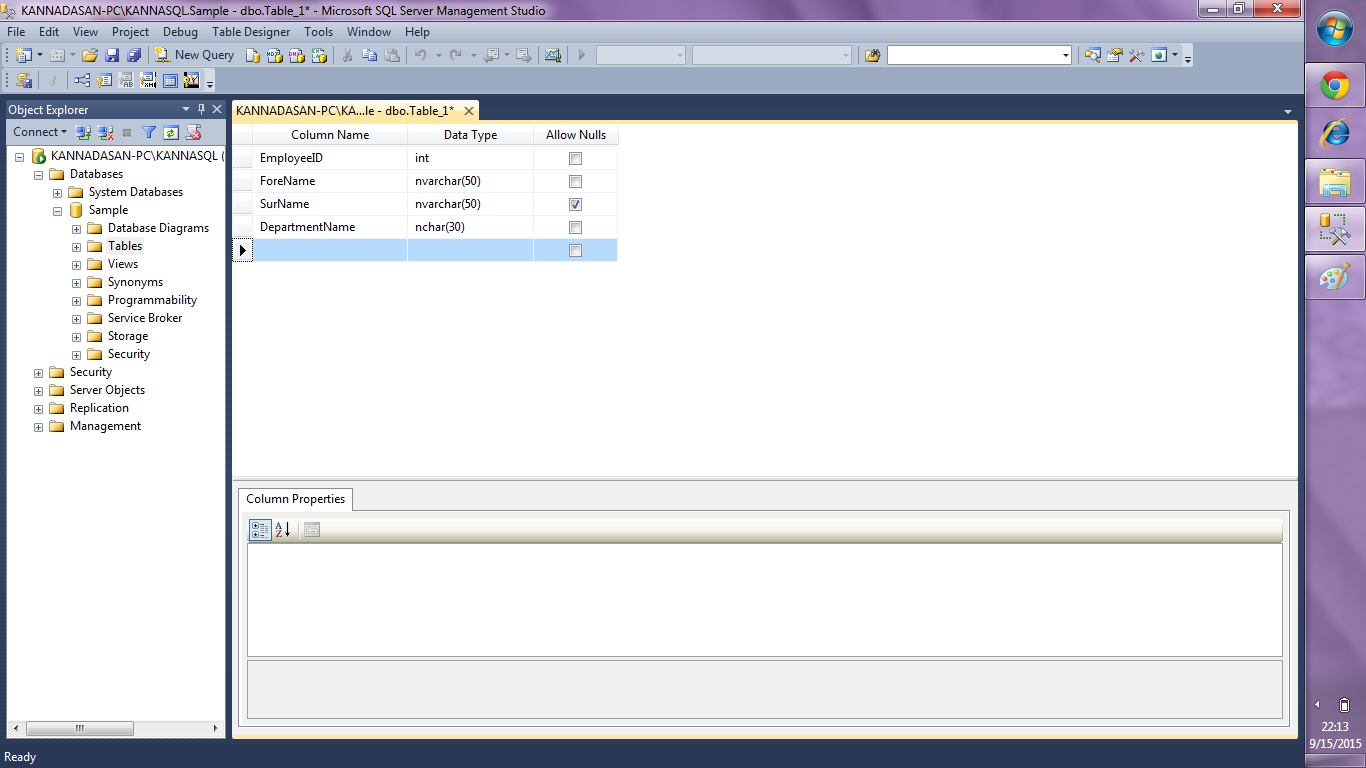


If the allow Nulls column is checked then it will allow Null value,else it will not allow null value.

Step 3 : 

In Column properties (Highlighted in Red colour) ,we can change the identity Specification to specify the start value and seed value.Initially the identity specification will be NO.


Step 4 :

Now I changed the identity specification value as YES.Identity increment is changed as 1 and identity seed is changed as 1.


Now the EmployeeID column starting value will be 1 and increment value will be 1.

Step 5 :

Now we need to save the table using File ---> Save (or) Ctrl+S command.Now the Choose name popup will appear.Once the table name is entered click OK to save the table.


Step 6 :

Now we can see the new table "Employee"created in the tables folder.


Step 7 :

Expand the table name and You can see the columns which we created in step 2.


Monday, 14 September 2015

How to Create a table in sql server ?

The table can be created in the database using the following syntax.

Create Syntax :

CREATE TABLE  [SCHEMA NAME] [TABLE NAME]
(
   [COLUMN NAME1] [DATA TYPE] [CONSTRAINT],
   [COLUMN NAME2] [DATA TYPE] [CONSTRAINT],
   .
   .
   .
   .
 [COLUMN NAME(N)] [DATA TYPE] [CONSTRAINT],
)

Example :

CREATE TABLE DBO.EMPLOYEE
(
   [EmployeeID] [INT] IDENTITY (1,2) NOT NULL,
   [ForeName] [NVARHCAR] (50) NOT NULL,
   [SurName] [NVARHCAR] (50) NULL,
   [EmployeeDep] [NVARHCAR] (50) NOT NULL,
   [Salary] [FLOAT] NOT NULL
)

Now we have created a new table called Employee.
  • EmployeeID is int column and not nullable.
  • ForeName is string column and not nullable.
  • SurName is string column and nullable
  • EmployeeDep is string column and not nullable
  • Salary is float column and not nullable.

Identity (1,2) refers to start value and seed value.

Here 1 refers to the starting value of the EmployeeID column.
2 refers to the incremental value of the EmployeeID column.

So the EmployeeID column first value will be 1 and next value will be 3 and 5 and goes on..
We can  also change the start value and seed value.(Eg : Identity(1000,1)).So the starting value will be 1000 and next value will be 1001,1002....(n).

Note : 


Nullable column will allow Null value.
Not Nullable column will not allow Null value.


Wednesday, 9 September 2015

What is table in sql server?

  • Table is a database object which can be used to store the data.
  • Table is a combination of rows and columns
  • The columns are created during the table creation.
  • Columns can also be added once the table is created.
  • Rows are also called as Records.